
POPULAR CHOICE
Coupon Code Listing
$49.00
- Magento 2.4.x Compatible
- PHP 8.1+ Supported
- Lifetime Free Updates
Lifetime Updates
30-Day Refund

$49.00

Customers will not miss any attractive promotions or have to find a discount code before making a purchase. All available coupons are now displayed in a clear list for them to pick.

Instead of introducing promotions to customers through emails that may not be opened, store admins now can easily show all coupon codes right at the view cart and checkout pages to incentivize them to place an order.

Showing coupon list for shoppers encourages them to make a purchase decision faster and reduce the chance they will abandon their shopping cart, hence an increase in your conversion rate.
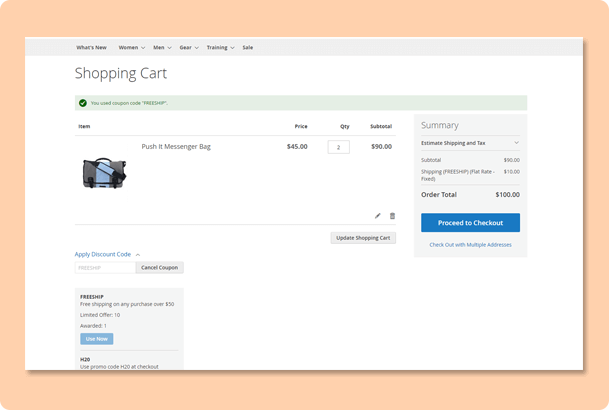
The list of coupon codes including the button Use Now appears both at the shopping cart and checkout pages of buyers. After clicking on the button to use the code, they will receive a notification if it is successfully applied.
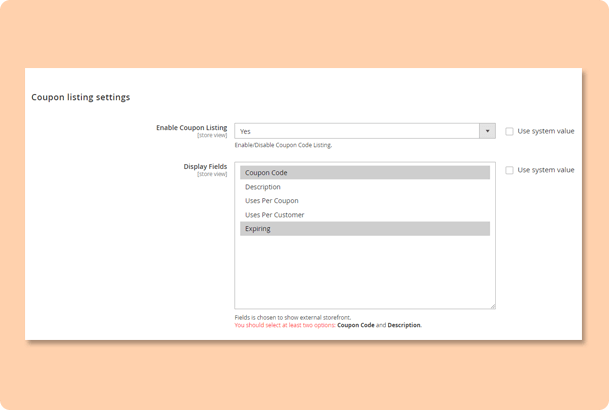
There are five information fields of the coupon for admins to choose to display: Coupon Code, Description, Uses Per Coupon, Uses Per Customer and Expiring. To make it easier for customers, you should select at least two options Coupon Code and Description.
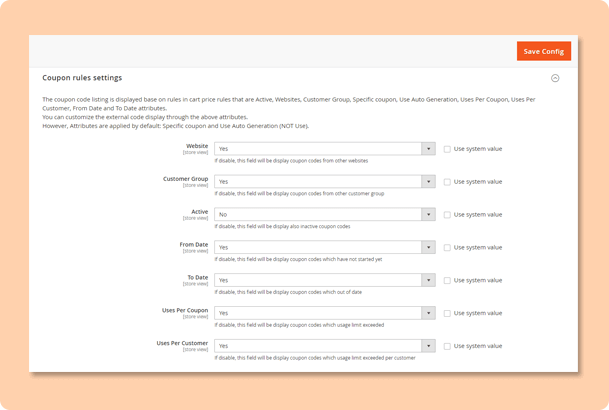
The coupon code listing is displayed based on the configuration set in Cart Price Rules. Store owners can even choose to show inactive codes, but the notification “The coupon code is not active” will appear below the code instead of Use Now button.

Free lifetime
software updates

Verified by
Magento Marketplace

One-time payment
without hidden cost
Magento 2 Extensions

Magento 2 Extensions

Magento 2 Extensions

Magento 2 Extensions
Copyright 2025 © magenest
Technical Support Hotline: 0999888777




Reviews
There are no reviews yet.